
Vim基础篇(三十一)——字符替换插件vim-clap
Vim基础篇(三十一)——字符替换插件vim-clap
前言:
在linux下编程,终端最是常用的工具,将Vim和Terminal配合好使用将大大提高效率。
1 介绍
vim-clap 是一个强大的Vim插件,提供了多种功能,其中之一是字符替换功能。它允许用户在Vim中快速查找和替换文本,支持正则表达式和多文件操作,非常适合处理大量文本数据。
- 异步处理(Async)
- 所有搜索操作在后台异步执行,不会阻塞编辑器。
- 提供流畅的用户体验,即使在大型项目中也能快速响应。
- 无需外部依赖(可选)
- 默认使用 Vim 内置功能实现,无需安装
fzf、ripgrep等外部工具。 - 可选集成
rg(ripgrep)、git等工具以提升性能。
- 默认使用 Vim 内置功能实现,无需安装
- 丰富的源(Providers)
支持多种查找模式,例如:Clap files:文件查找(支持.gitignore)Clap git_files:Git 管理的文件Clap grep:文本内容搜索(类似:Ag)Clap buffers:打开的缓冲区切换Clap marks:书签跳转Clap commands:Vim 命令补全Clap keymaps:查看快捷键映射Clap help:帮助文档搜索Clap symbols:LSP 符号查找(需配合 LSP)Clap quickfix/loclist:快速修复列表浏览
- 高度可定制
- 支持自定义主题、布局、高亮、按键映射等。
- 可通过 Lua(Neovim)或 Vim script 配置。
- 良好的 UI 体验
- 使用浮动窗口(floating window)或分屏显示结果(Neovim 推荐用浮窗)。
- 实时模糊匹配 + 高亮匹配字符。
- 与插件生态兼容
- 可与
coc.nvim、nvim-lspconfig、telescope.nvim风格互补(但更轻量)。
- 可与
2 安装
vim-plug插件为例,在vim中添加以下配置进行安装。在克隆完仓库后会自动执行命令 :Clap install-binary! 来安装可选的二进制文件以提升性能。
1 | Plug 'liuchengxu/vim-clap', { 'do': ':Clap install-binary!' } |
如果没有自动出发执行指令,也可在vim中执行手动触发,:Clap install-binary! 会下载预编译的二进制助手,用于加速某些功能(如 grep )。

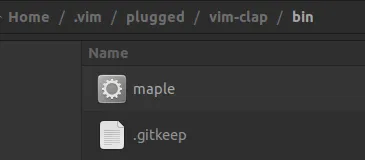
安装成功后可看到已经编译好的二进制文件maple。
3 配置
在vim添加以下配置
1 | let g:clap_project_root_markers = ['.git', 'go.mod', 'package.json'] " 根目录标识。 |
4 使用
以下是vim-clap支持的指令。
| 命令 | 描述 | 依赖 |
|---|---|---|
:Clap blines |
Lines in the current buffer | none |
:Clap buffers |
Open buffers | none |
:Clap colors |
Colorschemes | none |
:Clap command |
Command | none |
:Clap hist: 或 :Clap command_history |
Command history | none |
:Clap hist/ 或 :Clap search_history |
Search history | none |
:Clap filetypes |
File types | none |
:Clap help_tags |
Help tags | none |
:Clap jumps |
Jumps | none |
:Clap lines |
Lines in the loaded buffers | none |
:Clap marks |
Marks | none |
:Clap maps |
Maps | none |
:Clap quickfix |
Entries of the quickfix list | none |
:Clap loclist |
Entries of the location list | none |
:Clap registers |
Registers | none |
:Clap yanks |
Yank stack of the current vim session | none |
:Clap history |
Open buffers and v:oldfiles | none |
:Clap windows |
Windows | none |
:Clap providers |
List the vim-clap providers | none |
:Clap bcommits |
Git commits for the current buffer | git |
:Clap commits |
Git commits | git |
:Clap gfiles 或 :Clap git_files |
Files managed by git | git |
:Clap git_diff_files |
Files managed by git and having uncommitted changes | git |
:Clap live_grep (deprecated) |
Grep using word-regexp matcher | rg |
:Clap dumb_jump |
Definitions/References using regexp with grep fallback | rg with –pcre2 |
:Clap files |
Files | none |
:Clap filer |
Ivy-like file explorer | none |
:Clap grep+ |
Grep using fuzzy matcher | none |
:Clap igrep |
A combo of filer and grep | none |
:Clap tags |
Tags in the current buffer | none |
:Clap tagfiles |
Search existing tagfiles | none |
:Clap proj_tags |
Tags in the current project | universal-ctags (+json) |
:Clap recent_files |
Persistent ordered history of recent files | none |
本博客所有文章除特别声明外,均采用 CC BY-NC-SA 4.0 许可协议。转载请注明来源 OnlyCalm's Blog!
相关推荐

2019-07-27
GVim管理“工程”?
GVim管理”工程“?前言: 经常看到新手朋友问Vim怎么管理工程之类的问题,其实这是对Vim的误解,它只是个编辑器而不是IDE,它不负责工程管理。工程管理应该交给CMake之类的(不然你还指望能像vscode那样有WorkSpace功能吗?目前我没发现)。如果你只是想用GVim方便的管理文件和文件夹的话还是能做到的,具体可以用Vim自带的目录树管理插件或用NerdTree之类的插件。 用过之后你可能会郁闷遇到“如何让GVim启动就默认打开某个目录或文件?”,更方便点“如何想让哪个文件或文件夹用GVim启动就能立刻启动?”。这篇博客就是回答这两个问题的。 1 如何让GVim启动就默认打开某个目录或文件?1.1...

2019-07-21
GVim配置一个漂亮的NerdTree
GVim配置一个漂亮的NerdTree前言: GVim使用也有一段时间了,有空写几个简单的教程帮助新手快速上手,定制一个个性化的编辑器把。以下是我的NerdTree效果展示。 1 NerdTree插件1.1 NerdTree下载安装 如果你安装了插件管理器的化安装就很简单了,如果没有安装使用任何插件管理器,那我建议你还是装一个,因为vim你会用到的插件挺多的,有个管理器很方便。 将这句添加到vimrc中Plugin 'scrooloose/nerdtree',随后重启下vim然后命令模式下执行:BundleInstall(具体根据你装的插件,我装的是Bundle。)安装指令,完毕后最好再重启一次vim。 1.2 NerdTree配置 ps:...

2019-08-01
Leaderf的安装与配置使用
Leaderf的安装与配置使用前言: Leaderf使得Vim可以实现像IDE那样的模糊搜索功能,这篇文章介绍配置和使用的方法。 1 下载安装Leaderf 如果你安装了Vundle, 那么直接再Vimrc中添加指令Plugin 'Yggdroot/LeaderF'等待安装完成即可,如果你没有装Vundle,那直接去github上下载并解压拷贝即可。 需要注意的是Leaderf还依赖与ctags和rg(这个插件全名是Rigrep)插件,如果你还没有装可以去github上直接下载Release版的,将其中的*.exe文件拷贝到与GVim.exe同级目录即可。 2 Leaderf常用指令2.1 查询文件::Leaderf file 默认是从根目录内的文件中查找。 2.2 查询函数: :Leaderf function 默认是再当前文件中查找函数。 2.3 模糊查询字符串: Leaderf...

2019-08-01
Vim几种跳转方式
Vim几种跳转方式前言: 以下时我常用的一些跳转指令,用于参考和复习记忆。还有一些后续会更新。 1 文件内跳转1.1 移动光标 普通模式下左h,右l,上k,下j。(可以使用数字+hlkj,实现跳跃式移动)。 1.2 字符间跳转 跳转到当前字符的前面:普通模式下i。 跳转到当前字符的后面:不同模式下a。 字符串间跳转 向右跳:普通模式下跳转到串首w,普通模式下跳转到串尾e。 向左跳:普通模式下跳转到串首b,普通模式下跳转到串尾be(这个似乎没有专门的指令)。 高亮文件内的某字符串所有出现处,并在高亮处跳转:先将光标移动值至目标字符串处按*。 高亮匹配结果中往下跳:n。 高亮匹配结果中往上跳:N。 关闭高亮:noh。 1.3 行内跳转 跳转到行末:普通模式下键入$光标移至行末,普通模式下键入A光标移至行末且进入插入模式。 跳转到行首:普通模式下键入0(^会忽略行首的空格,跳到第一个非空格字符处,0则跳到第一列)光标移至行首,普通模式下键入I光标移至行首且进入插入模式。 跳转到行内某个字符(比如字符a):往后跳f +...

2021-01-23
Vim基础篇(一)——光标跳转
Vim基础篇(一)——光标跳转前言: Vim编辑文本之所以高效的一大原因是其灵活的光标跳转功能,无需鼠标参与,因此有必要熟练掌握Vim中的光标跳转。这篇文章将详细介绍Vim几种模式下的光标切换。 1 普通模式(Normal mode)1.1 窗口内移动1.1.1 行间移动 ‘n’ + ‘k’光标向上移动n行,n默认为1 ‘n’ + ‘j’光标向下移动n行,n默认为1 ‘{n}’ + ‘gg’移动到第n行,n省略时移动到第一行的行首 ‘{n}’ + ‘G’移动到第n行,n省略时移动到最后一行的行首 ‘n’ + ‘%’跳转到n%处 ‘n’ + ‘-‘向上移动n行至行首,n默认为1 ‘n’ + ‘+’向下移动n行至行首,n默认为1 ‘H’移动到屏幕可视有效行的第一行行首 ‘M’移动到屏幕可视有效行的中间行行首 ‘L’移动到屏幕可视有效行的最后一行行首 ‘[‘ 行首:一行的第一个非空白字符。行末:一行的最后一个非空白字符。 1.1.2 行内移动 ‘n’ + ‘h’光标向左移动n列,n默认为1 ‘n’ + ‘l’光标向右移动n列,n默认为1 ‘n’ +...

2021-01-26
Vim基础篇(三)——缓存操作
Vim基础篇(三)——缓存操作前言: Buffer是一块内存缓冲区,Vim打开文件实际是把文件的内容读取到缓冲区中,未保存时修改内容实际是修改缓冲区中的内容,保存文件就是把缓存中的内容写入到文件中(文件是存储在硬盘)。对Vim的缓冲区有一定熟悉了解,并掌握一些基础的Buffer操作将会使我们的编辑过程更加随心所欲。 1 Buffer的创建或删除 Vim打开文件实质是将处于硬盘的文件内容读取到内存中,也即只要是打开文件的操作Vim都将为打开的文件创建一个缓存空间。例如vim file1 file2 file3即为同时打开三个文件,相应的创建了三个Buffer。 Buffer与窗口不是一一对应的关系,但Buffer必须借助Window才能显示。 将当前缓冲区内容写入文件,也就是保存文件,如果设置了readonly则不能写入,如果加上!表示”强制“,即使只读也可强制写入文件。 1:w[rite][!]...
评论
ValineGitalk